Core infrastructure: OpenClaw
If you have ever tried using a standard AI chatbot to track long-term habits, you will have quickly run into a brick wall. The moment you delete the session, or start a new conversation, the AI loses the context of your previous data and preferences. Large Language Models (LLMs) do not inherently retain information across separate sessions. To build an AI assistant that works over long periods of time, you need state — a persistent record of your history, metrics, logs and goals saved to local files that the AI can access every single time it runs.
OpenClaw is an open-source framework designed specifically to bridge this gap, acting as a lightweight orchestration layer that pairs LLMs with persistent, file-based memory. The real value of OpenClaw isn’t just that it handles text files to build and use this state; it gives you a ready-made infrastructure to manage multi-step state management workflows without you having to build the backend yourself.
Find details on my deployment of OpenClaw at Deployment and setup and Data ingestion and security.
Many more details on OpenClaw can be found at OpenClaw documentation.
What happens behind the scenes
In plain terms, OpenClaw runs quietly in the background on your local or remote machine. It acts as a gateway between your everyday messaging apps (like Telegram or WhatsApp) and your local files, tools, and chosen AI model. Instead of forcing you to manually feed files into a prompt or write custom scripts to parse text, OpenClaw drives the entire machinery itself, using its local environment to read state, run code, and execute multi-step workflows.
The gateway processes events through two main triggers:
- Incoming messages: Text, commands, files, or audio sent via your connected chat channel.
- Autonomous heartbeats: A background timer that wakes the AI up at scheduled intervals. It checks local checklists (like
HEARTBEAT.md) and lets the AI proactively message you or run routines without you having to prompt it first.
When triggered, the gateway manages the session, injects historical context from your local text files into the LLM prompt, routes the payload to the agent runtime, and updates the relevant state files based on the agent’s actions.
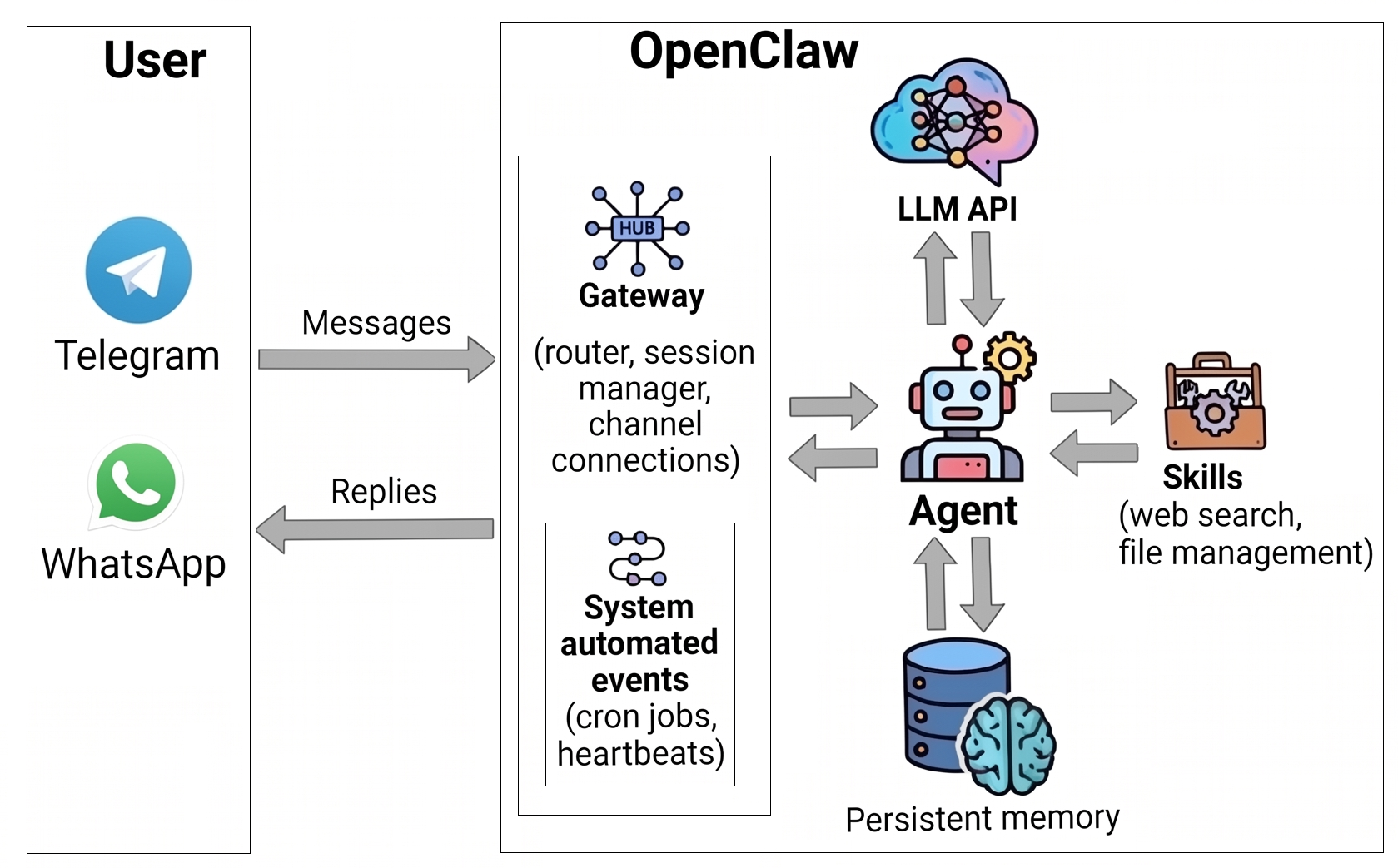
Setting up your files and instructions
While OpenClaw automates the routing, it is not magic and its execution accuracy depends heavily on the structured data and instructions you provide. Because the framework relies on plain-text files to maintain state, you are fully in control of the logic through two components:
- File organisation: Your directory and data structures must be clean and predictable. Poorly formatted or organised json or markdown files can cause the agent to miss historical context or make reasoning errors. See further details in File structure.
- Explicit instructions: The agent requires clear and deterministic operational guidelines. You must write clear, zero-ambiguity agent instructions, including telling the agent exactly when to check a specific state file, what data points to look for, and exactly how to format any new notes it appends. See further details in Agent instructions.
What’s next
In the next few posts, I’ll break down exactly how I configured OpenClaw, built out the file structure, set up guardrails, and optimised costs:
- Deployment and setup: My deployment of OpenClaw via Docker on a Hostinger VPS.
- Data ingestion and security: How I pre-process the data fed into OpenClaw and explicitly restrict its capability scope to keep my personal data secure.
- File structure: How I organise directories and memory files for different coaching agents.
- Agent instructions: Drafting the markdown files (
AGENTS.md,TOOLS.md) that set the operational rules and guardrails. - Model selection: My experimentation with picking the right LLM for different coaching tasks.
- Cost optimisation: Monitoring scripts and tweaking parameters to keep API usage and expenses minimal.